Showing posts with label how to. Show all posts

See Why You Should not Try Data Recovery Yourself
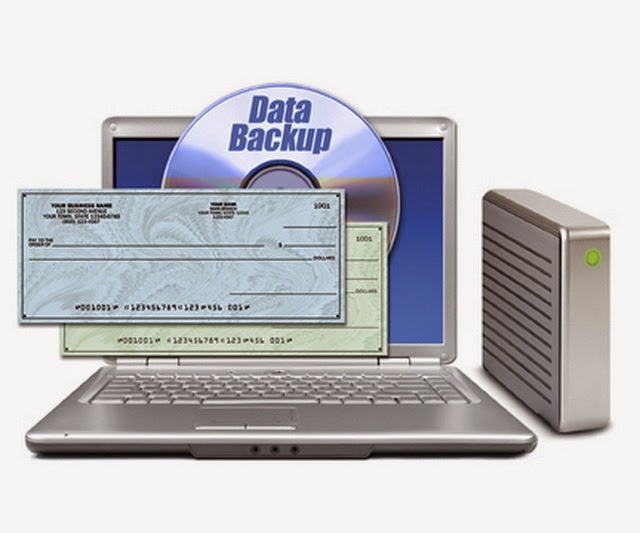
In the world of computers, data recovery is something we all know and rely on to recover lost of missing data.  The process of data recovery is very complicated, one that you should never attempt to do yourself.  Hard drives especially, are very fragile and need extra special care when they are worked on.  You have to be careful with the small components inside of them, which is why only a trained specialist should be attempting data recovery.

When you first take your hard drive to a specialist, they will perform an evaluation then get back to you and tell you the problem, as well as the cost.  When most people get their price quote, they immediately think the price is too high.  As this happens, the individual will decide to try their own data recovery.  This isn’t the smartest idea, as it normally results in your data being lost forever.   In most cases, where individuals attempt data recovery themselves, the data is so far gone that even the best data recovery specialist can’t bring it back.

When the hard drive crashes and data cannot be accessed, most people will think about using a disk repair utility.  This isn’t a good idea, as the software will normally write to the disk, causing the data that is currently stored to be overwritten.  These types of software programs can be very complex, and in most cases, won’t fix the problem.  They should be avoided at all costs, for the simple fact that they won’t bring back your data - they will only make things worse.

Another common mistake people make, that should never be attempted, is to open up the hard drive and try to rebuilt it.  Hard drives are full of very delicate components, many of which are very small, and very fragile.  The platters are the most sensitive inside of the hard drive, as they are small and contain a layer of magnetized material.  This material is very fragile, and sensitive to debris, dust, and especially your fingerprints.

If you don’t know how to handle the platters, you can easily scratch their surface, which could indeed damage them forever.  There is a spindle inside of the drive, which constantly moves the platters.  A motor is there as well, which determines the speed that the platters revolve.  The platters store data for the entire drive, which is accessed by an actuator arm.  When the hard drive is in operation, the platters and the actuator arm move at very fast speeds, which is why everything has to be perfect.

If you go to tamper with the drive and attempt to rebuild it yourself, you’ll more than likely damage something.  The technicians that work with data recovery on a daily basis are experts with hard drives, and know exactly how to handle the devices.  They know how to handle the platters, the actuator arm, and how to put everything back in a complete working fashion.

Some people out there have been told that hitting or even dropping a hard drive can fix common hardware problems.  This is not the case, as hard drives can easily break if they physically abused in any way.  The interior components are very fragile and do not react well at all to any type of abuse or physical mistreating.

Whenever something happens to your hard drive and you lose your data, you should always leave it to the data recovery experts.  Companies who specialize in data recovery can recover your data, and do it the right way - which can save you time and money in the long run.

10 Common Reasons To Remove Spyware From Your Computer

Is your computer been running slower than normal? Are you worried someone may be able to access your computer and steal your private information and use it against you? If so, these are feelings I have shared with you in the past.

Some time back, my 3-year old computer was running so slow that I had to buy a new computer. Or at least I thought I needed a new computer. Then within a matter of weeks of surfing on the Internet, my new computer was also running so slowly. In addition, some programs did not run well on my computer, and I did not recognize some of the programs that were running on my computer. That scared me most. Were these programs that were tracking my keystrokes on my computer or programs I just not remember installing? I knew I had to find a answer and solution fast.

The truth is, we can all put up with a slow computer, but very few of us would want others to have access to the information on our computers, but that is exactly what can happen when spyware or malware is loaded on our computers without our knowledge.

According to Spyware Nuker’s web site, “Spyware applications are programs and files that hide on your PC's hard drive without your direct knowledge. These programs allow hackers and advertising companies to track your every move, both online and even when you work offline. They can track the websites you visit, the items that you buy online, the emails you send and receive, your Instant Message dialog, and worst of all they can even record your credit card number, personal identification numbers, and all of your passwords. If you use dial-up to connect to the Internet then spyware can be used to bill 900 numbers to your phone bill. This is just a short list of the harm that spyware can cause.”

The web site also provides statistics that show spyware is a huge problem effecting many people. "27.3 million Americans have been victims of identity theft in the last five years, including 9.91 million people or 4.6% of the population in the last year alone."

In addition, it is very easy for your computer to become infected with spyware as "The majority of all downloadable games, music, screensavers, etc., can infect your computer with SpyWare or AdWare. Most people do not know that after simply clicking on a random "pop up" ad, their computers may have been infected with SpyWare or AdWare."

No matter how we get spyware, here are 10 very real reasons you don’t want spyware on your computer.

1. Your computer may start running slower
2. Some programs on your computer will not run correctly
3. You may not recognize programs that are now on your computer because they may have been installed there by a spyware related web site or program you loaded on your computer.

In addition, you might be worried that: 

4. Someone might be able to read your e-mails
5. Someone might be able to access your e-mail list
6. Someone might be able to see you track the keystrokes you type
7. Someone might be able to access your credit card information on your pc
8. Someone might be able to access your passwords list on your computer
9. Someone might be able to steal your social security number
10. Someone might be able to track all the web sites you visit

As I mentioned, most of these programs get on your computer with out you even knowing, but another frustrating part is I recognized a few of these programs because I remember installing AND uninstalling them! So now I know that when we install some of these handy little utilities to track passwords online or programs to help with e-mail or keep track of the weather, even if we uninstall them, they may not be gone from our computers. They are still in our computers, waiting to spy on us, at the least.

A great way to find and remove spyware is to run a spyware detector and remover. Most spyware detection and removal software today offers a free scan to verify that you do or do not have spyware on your computer.

How to Make your Computer your ATM

Do you think that ATM’s are only available at banks and credit unions?  Think again.  Your computer can become your own personal ATM machine.  How can you turn your computer into a money making machine?  Jump into the world of internet marketing.  An Internet marketing business is not only profitable, but can be started quickly and affordably.
How to Make your Computer your ATM
What should you do first to help you start an Internet marketing business?  You need to create a website that reaches millions of potential customers all over the globe.  There are hundreds of software programs, companies, and offerings out there.  If you are not familiar with Internet infrastructure then you may have a difficult time trying to find the right company to host your website.  We have taken the confusion out of this situation for you by providing references for the best software tools to help get you started.

First, you will need a domain name.  Domain names are the text that users will type into the Internet to access you website.  Think carefully about your domain name so that it is relevant to your product or service.  Once you have a domain name in mind, you need to make sure that it is not taken.  You can type it into your Internet browser and see if anything comes up.  However, it is good to check this through the domain provider we recommend which is www.godaddy.com.

When you purchase a domain name at www.godaddy.com, make sure that you only purchase the domain name and none of the extra services.  Godaddy has a tendency to jack up the prices on these services when you can find them much more affordably at www.frontierpowerhosting.com.

Frontierpowerhosting.com will be your web hosting service.  This web hosting Service Company is top notch because you receive your OWN IP address.  It is critical to have your own IP address so that your emails are never blocked due to an email spammer that has the same IP address.  Frontierpowerhosting.com also has excellent customer service phone support.  In addition, Frontierpowerhosting.com provides an “Email Tracker” feature which enables you to track your emails.  Frontierpowerhosting.com also will provide you with information regarding the deliverability rate for any emails you send.  This information will help you tailor your marketing efforts.

Next you will need to setup a “smart Autoresponder”.  A smart Autoresponder is one that automatically sends emails or forms to users in order to capture their personal information.  Make sure that your Autoresponder captures the following information:  first name, last name, email address, time and date stamp.

An effective smart Autoresponder is called “Auto Responder Plus” which you can find at www.arp3.com.  Auto Responder Plus is software that you can download on your web hosting account.

Once you have these tools in place, you are ready to create your website.  Change your personal computer into a cash cow today!

How To Backup Data On Your Laptop


If you were to look at past statistics regarding the information that has been lost in regards to laptop computers, you would find yourself amazed.  Even though this information can be astounding, many of us still don’t take the time to back up the information on our laptops.


To put it in simple terms, nothing in the computer industry is fool proof.  Hard drives can crash, the laptop can get stolen, or it can even be dropped and rendered useless.  To ensure that we are never left without our precious data, we should always create a backup of our information.

There is no mistaken the fact that over a million laptops have been stolen over the years in the United States alone.  Anytime a laptop is stolen, chances are that it won’t be recovered.  If the information wasn’t backed up, then the owner will be left with no laptop - but more importantly - no backed up data either.

Just like you can with desktop computers, you can also create a backup of the data on your laptop as well.  You can use online services, back it up remotely, or use several other methods to ensure that you keep all of your data.  Preserving your data is something you should really look into, especially if you have business material on your laptop.

The best way to go about backing up your data and files is to burn them to a data CD.  Data CDs can hold up to 4400 MB (Mega Bytes) of data, which means a lot of files.  To back things up this way, all you need is a CD/RW burner in your laptop, which most of the newer ones come with.

The only drawback to laptops is the fact that they don’t offer near as much storage or security measures as a desktop PC.  Desktop computers have a lot more power, and they can also do things (including backups) in a fraction of the time.

The laptop computer was designed for on the go use, which is the main reason why people don’t really think about backing up their data.  When the thought finally does come to mind, it is normally too late to do anything about it.


As mentioned above, the easiest and quickest way to backup your laptop data is to use an online backup service.  Depending on your connection to the Internet, it can take anywhere from several minutes to several hours.  Although it may take you a little bit of time, you’ll have the satisfaction in knowing that your data is there if something should happen.

Whether it’s for your business or personal use, you can’t go wrong backing up your data.  You should always create a backup of your data at least once a month, even more than that if you have a lot of important information that you add to your laptop on a frequent basis.


How to Create a virtuel Drive to run image files

We always download many kinds of files ( Games , Softwares, OS...etc ) and most of the time we don't have the time to burn them on CD or may be because we don't have a CD drive specially for the ones who have notebook they get this kind of problems most of the time so they can't deal freely with image files (Iso, Bin, Daa, mdf, mds, nrg, Img, Ima, bif, Cdz, Cdi, cue, Lcd, Ncd, dmg, vhd) but this time i got you a simple methode to make you run image files on your computer ( PC, Notebook, Laptop ) , So please follow my instructions as the pictures below show and hopefully you will be able to run any kind of image files on your virtual drive .

I will be using Power ISO:  http://www.poweriso.com  so try to get your version than follow me .

After opening Power iso do this :
poweriso

It will ask you to restart on the first time so restart your computer
poweriso

Now let's try what did on the first step to create virtuel drive 
poweriso

Than  mount image that you want to use on that drive
poweriso

Select your file
poweriso


NOTE :if you have Questions you're very welcome to ask .

How to Convert Adsense Code for Blogger

webmasters keep o developing their sites and blogs but most of the time they have hard time dealing with adense codes , specially the ones that use Blogger platform they find some problems using the deffault code of adsense ads so in this article i inculuded a little box to help you convert your adsense code in to html.


Instructions

Paste your Adsense code or any HTML in the empty box and then press the Convert button.

What is the FAT and NTFS system and better between the two??

File system is the most widely used techniques for storage and widespread in the world and at the level of many devices , such as hard disk drives and storage switches and optical discs such as ( CD / DVD ) and others. And used this technique for the purpose of writing files stored on a specific area and called CLUSTER devices or SECTOR even be adjustable data and restructuring .And different storage technologies into several different techniques with several features and possibilities by evolution , and thus we decided the world of professional computer family put this topic in order to understand more of these systems .
 Operating system files "Fat" File Allocation Table: 
What is known as a table " File Allocation " means scheduling files for easy access to it and its two Fat16 old type began in 1980 and Fat32 which has spread recently since 1996 and is a development of the type of the former as it is used in larger areas larger than 2 GB House for partition one reverse the former type . appeared with the beginning of operating systems "WINDOWS 98" and "WINDOWS 2000" can also be used as a file storage system in advanced operating systems such as system "XP".
 Operating system files " NTFS
 "And is the latest technology and systems, and considered the most powerful and the best  in dealing with files and storage capacities high which is supported by several versions of operating systems "XP, NT, 200" It is also available on many features that make it the best in its predecessor and reflected these advantages in being :- Protected file storage system allows secure greater volume either by giving a password for users who are authorized to deal with them or offers a secure level by encrypting files
.- Allows better use of the available space of the volume and the ability to store files small size in a smaller space .
 - The ability to recover deleted files and data . 
- More stable and easier to deal with hard .

http://static.ddmcdn.com/gif/adding-a-hard-disk-1-1.jpg 

But who is the best among these systems?I can not say better because everything is special , but his cons we can say :
This is advisable to run the FAT file storage system 32 of the divisions that contain operating systems while the other divisions or other Alberthinat , recommended the use of modern and sophisticated system NTFS for easy extraction and protection of data and files . And each user choice;You do not forced to this rule but you choose the best
storage system that suits the nature of your work .

This simple picture has decided to share with you the difference between the two systems show
https://encrypted-tbn1.gstatic.com/images?q=tbn:ANd9GcRwUFzkGnKJd9M3DHFonItua-Mb70tXRvdJ-uS1ALTHMDiHsDuX
 

How to regain 20% of the flow of the Internet maintained by the windows without using them

People use the internet but they don't know that their computer hide 20% of internet speed without even using it  an this time i'll show you how to regain that 20%  of internet with simple stpes :
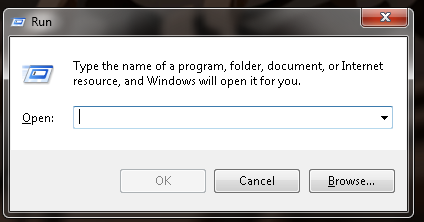
1)_ open run ( windows button + r)
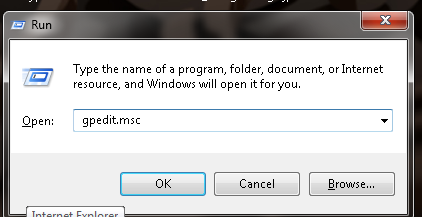
 2)_ copy this "gpedit.msc " 
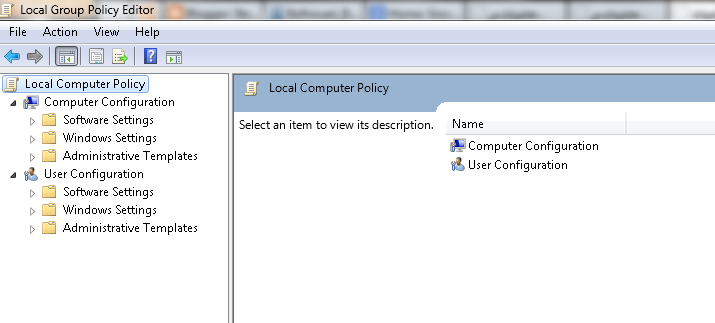
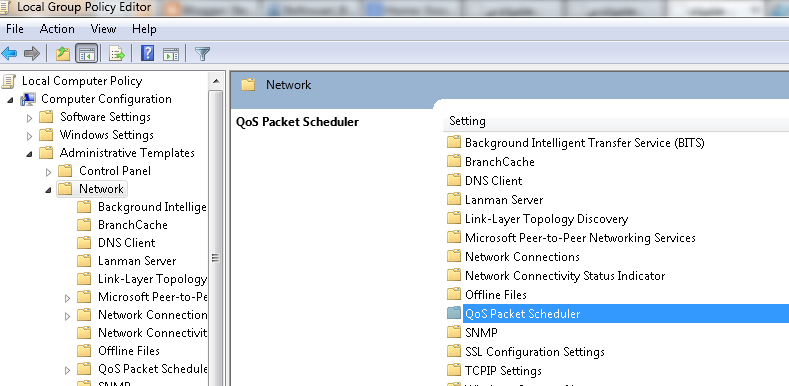
3)_ you'll get this windows :
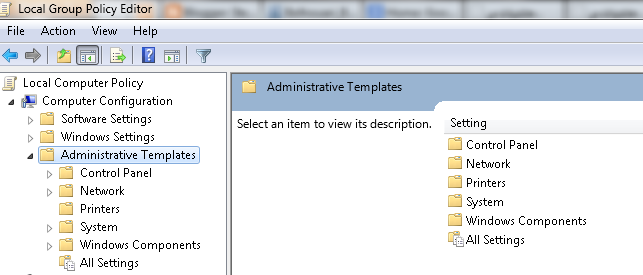
4)_  Go to " Administrative templates " :


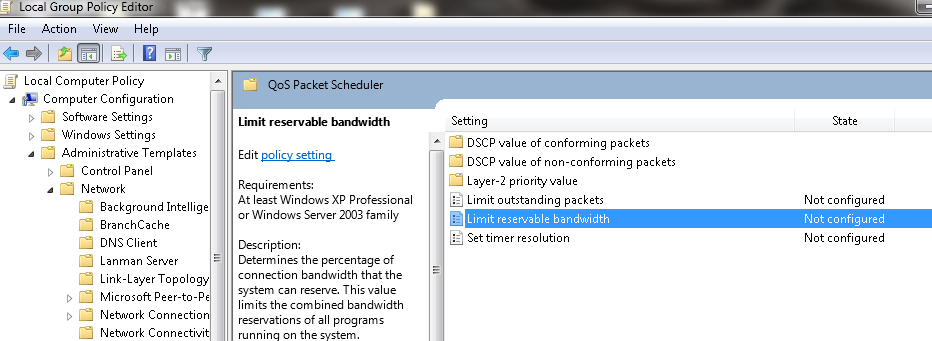
5)_ Go to " Network " and get in " QoS Packet  Scheduler "
6)_ Double click on " Limit reservable bandwidth "


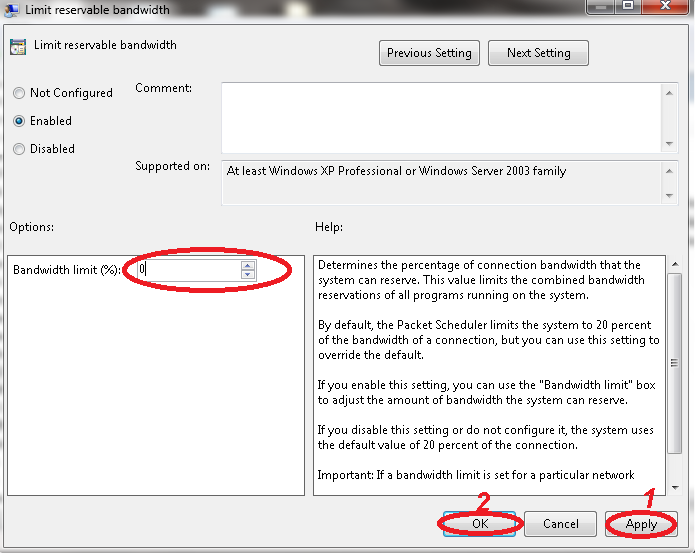
7)_ Now just do as you see in this picture :

I hope this trick helped you , if you have any question just leave it in comment , and don't forget to share this article with your friends.

How to Activate 3D in Win 7 and Win 8

Lately i saw a lot of people sharing pictures of computer screen with a lovely addition i mean the 3d option so i try to look for a simple way to do it so just follow the below steps to do it :

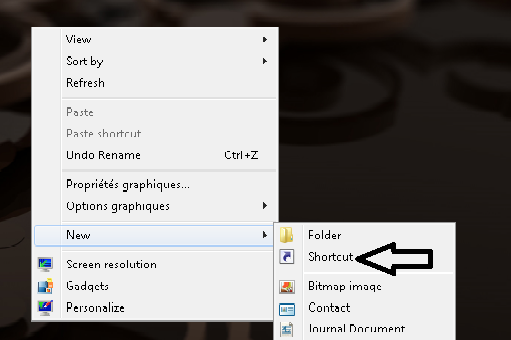
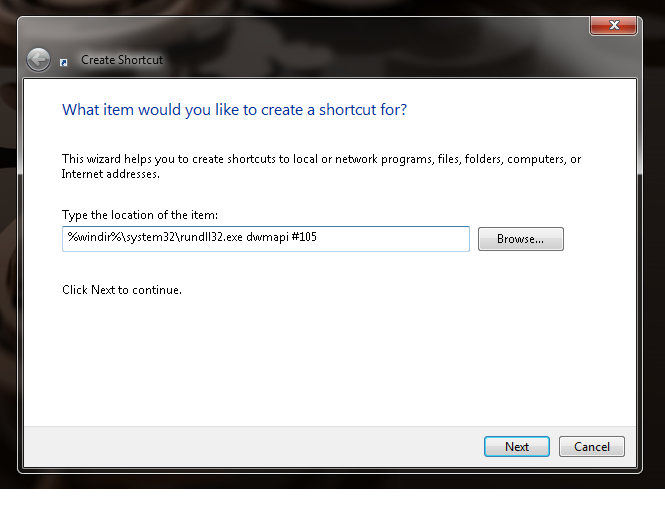
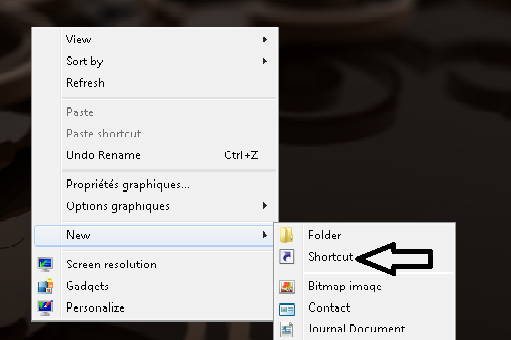
1)_ let's try to make a shortcut :


2)_ Now copy this code : " %windir%\system32\rundll32.exe dwmapi #105 "

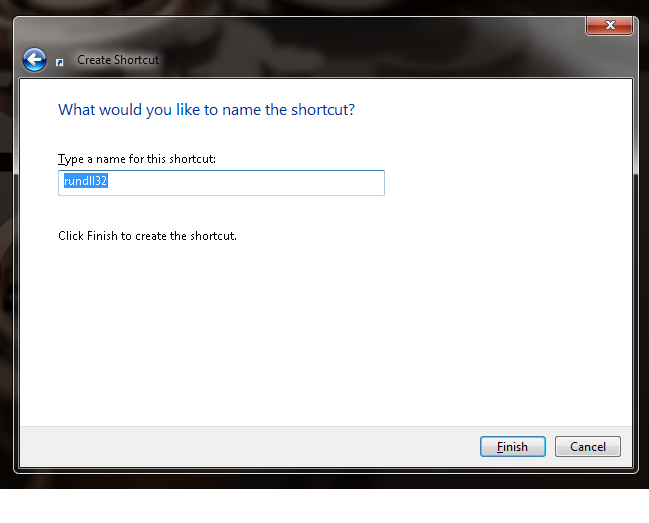
3)_ click next and give it a name

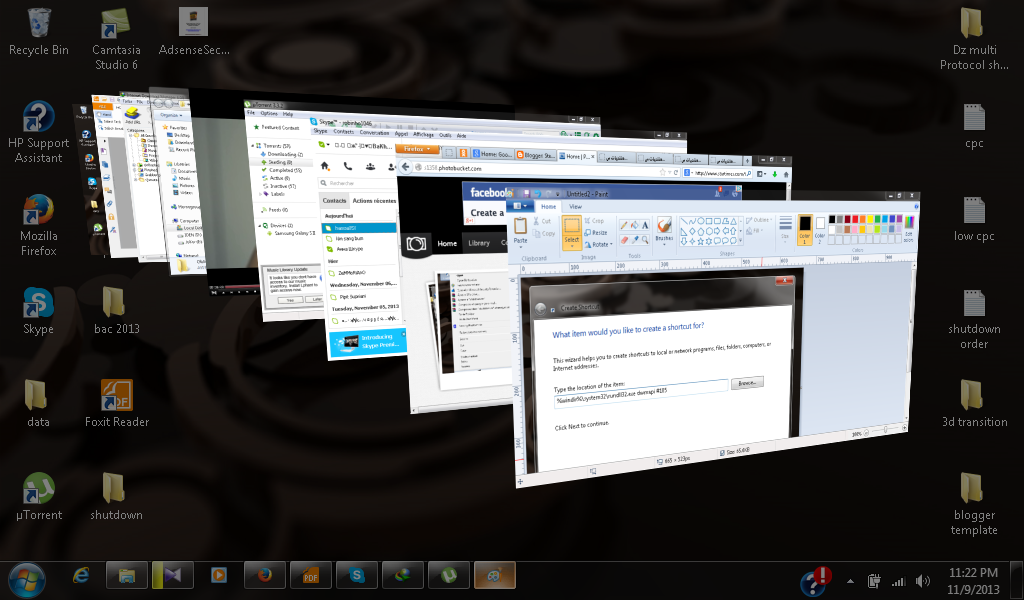
4)_ Now open the shortcut and get the result


How to Create shutdown button

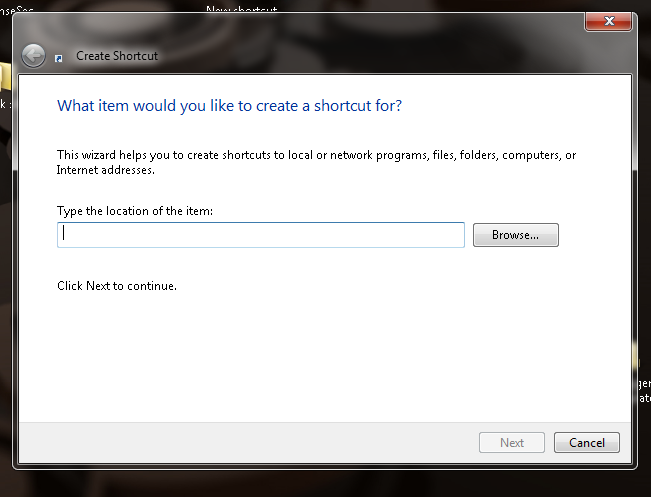
a lot of people ask me how they can create shurtcuts so they can do some stuff easy and today i just want to share with you  a way to creat shutdown shortcut  it's so simple and easy and it doesn't take to much time to create a shutdown shortcut .
so follow the steps below :

1)_

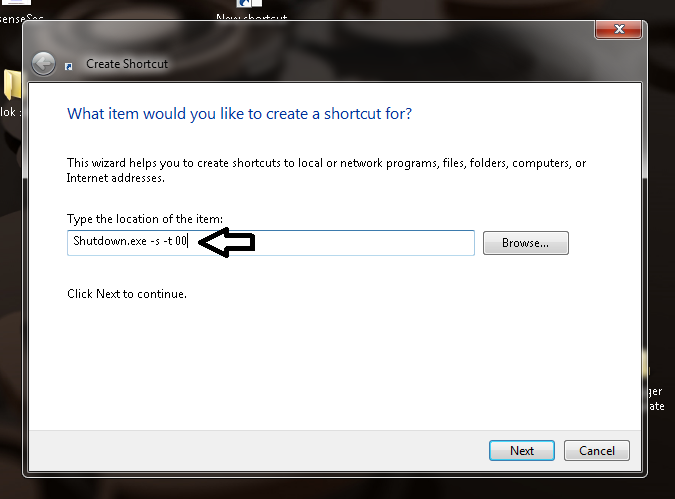
2)_


3 ) write : " Shutdown.exe -s -t 00 " ( the 00 is the second that your computer will take to shutdown)


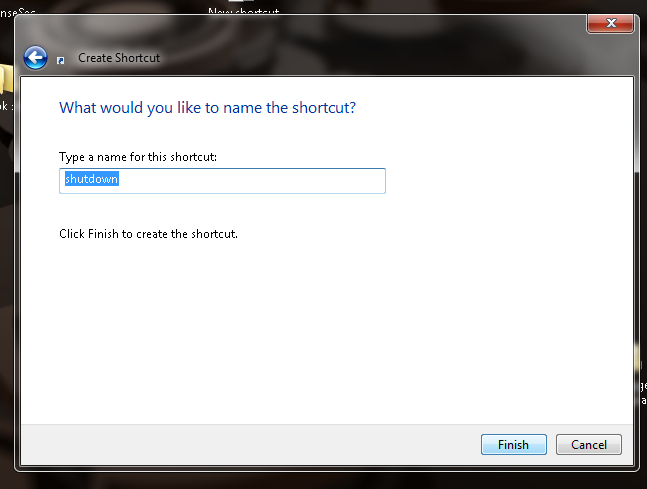
4)_ click Next  , and you'll see tha neme of your shortcut you can change it if you want .

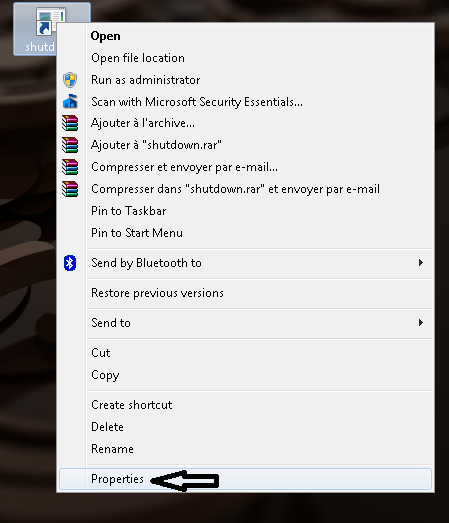
5)_ after you click finish you'll get your shutdown icon , so let's give it an icon image to identify it .

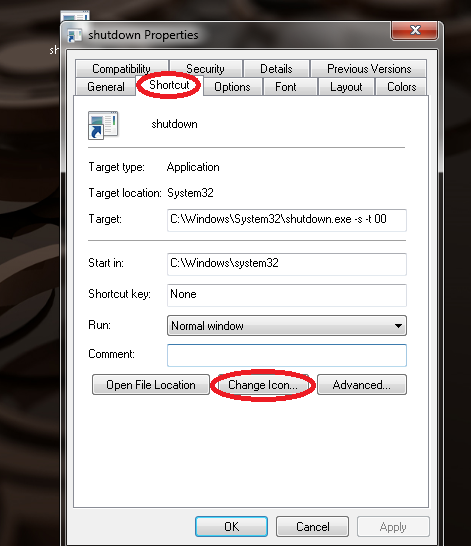
6)_ now you'll see the properties of the shortcut so just click on shnge icon .


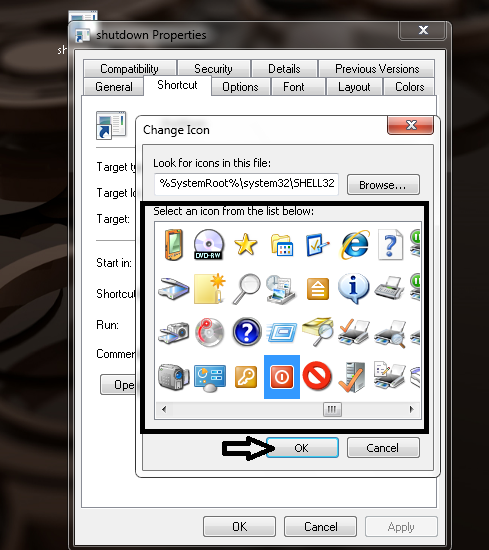
7)_ after you click on change icon it's will show you the system icons and even so you can choose and icon from your data in computer .

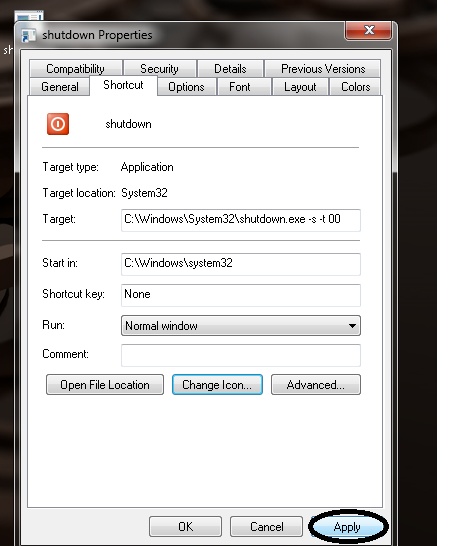
8)_ fter you choose an icon just click ok and " apply " what did than click " ok "  :


and here our tutorial end so i hope you like it , remember to share .

How to Block Website In Firefox

Most of the parents love to keep their children safe from the bad side of the internet and as we all know that adults sites contain a lot of things that all the parents don't want their children to see and  for that i try to look for a way to block adults sites and let you have a very safe internet surfing for your children , so let's start :
In this tutorial i'll talk about how to block sites on Firefox :

Firefox website : https://www.mozilla.org
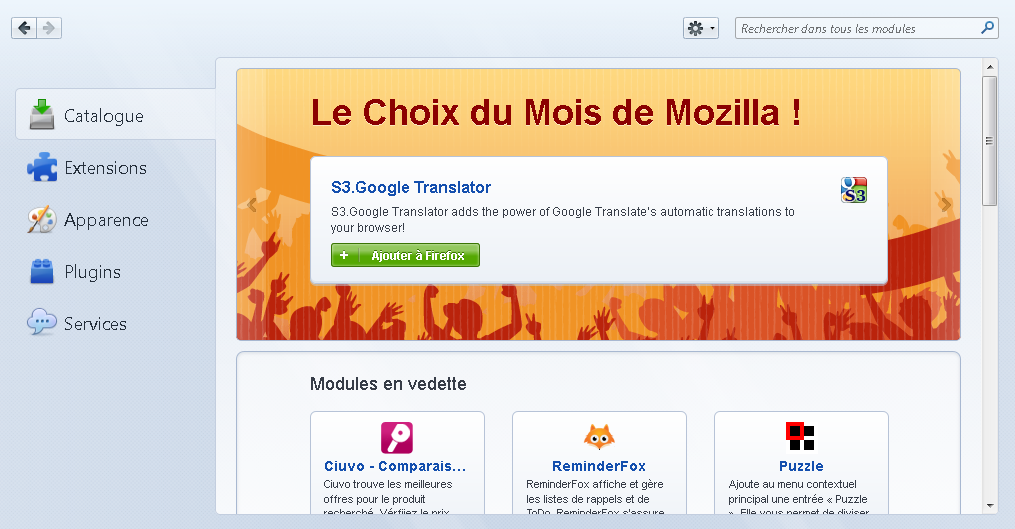
so first open firefox and follow my steps .
 1)_
2)_ 


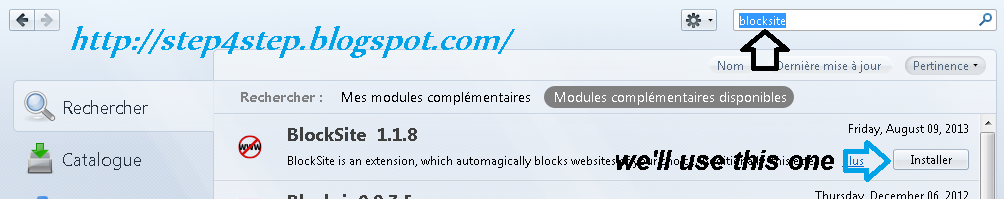
3) write " blocksite" in the search box above :


4)_ install the extension and restart the firefox :


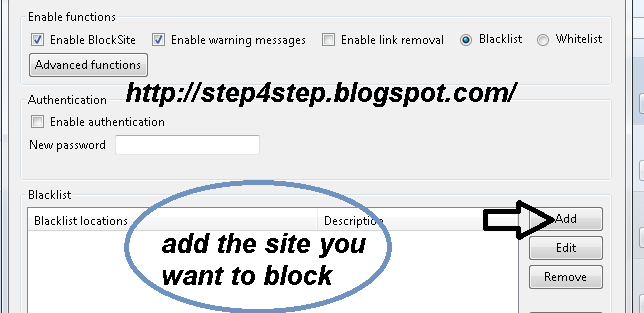
5)_ in this window you can add the sites that you want to block :


and finaly i would like to ask you to share this article so other people can protect their children from adult websites .

How to download youtube videos

Recently i get a lot of people asking me about " how to download videos from youtube ? " to be honst with you guys there's a lot of ways to do that but today i'm going to show you some steps that i already tried :

1)_

The first way is to use IDM (internet download manager) : it's a very effective software and it doesn't requir anything just install it on your computer and start downloading from youtube.
 

2)_

The second way is to use Mediaconverter.org (Verified) :
 it's easy and very good for all the kinds of videos and specially with youtube it's so good 

3)_

the third way is to use ClipGrab (Verified):
this software is the best of all because it allow you to download the videos fast and without thinking even about it because all you need to do is to put a link and download it as you wish . 


The second step is to get the video link :
eg: https://www.youtube.com/watch?v=-XXXXXXXXXX
Look at the picture

4)_
this is the most common way because some people use it is the browser extensions so all  you need to do is to get


this the add-on  page for firefox
___________________________________________________
I hope this Tutorial help , so just share our blog with your friends .

Db9 schema for shiring

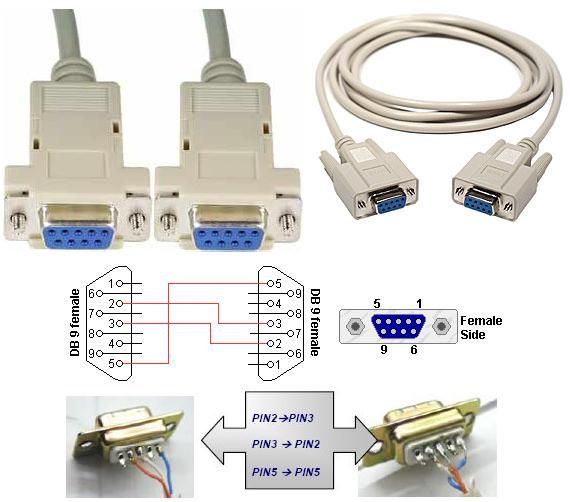
Lately most of the people use DB9 cables for shiring in their receivers to watch scrambled channels but some of them don't know how this kind of cables work or how it's schema look like even so there is some people who want to make a long distance cable so they can move to any place they want easily  and without any problems so they should know how DB9 schema look like and what they suppose to do to make work perfectly .

the first thing that you should do before making your cable ready is that you get your receiver and and computer ready for this by getting shiring programs like Obox, gladiatore ...etc and for the reciever you should set the protocol you want to use ( twin protocol or Gbox sssp ) for people who have starsat 1200 D with tiger update  it's ECM .

so the below picture show you how the schema of DB9 cable look like :


Don't waite and share this articles with other so we can all learn new things together .

How to Create a Bootable Ulaunch ELF CD

How do I make a uLaunchELF bootable cd?

it very easy and simple to create a ulaunch elf cd  but u also need to know what you're going to do with ulaunch ELF  and what it's turn .

Ulaunch ELF :  

it's the most common software that help you to read what's inside every connected device with your consol ( usb , harddrive...etc) and use the data inside it as you please, ulaunch ELF  is been used for playstation2 usb option because it help you install free Mc boot apps in the Memory Card of the playstation , so you'll be controlling your playstation 2 functions with it and put other software like ( open ps2 , usb advance...etc) to allow you play converted games from the usb ulaunch ELF is the greatest software in everyway and for people who don't know how to use it just look for uLaunchELF Original Documentation .
_ what you need to burn uLaunchELF Original Documentation in cd ?
first you need an iso burner ( Xilisoft iso burner or Power iso  ) than burn the uLaunch ELF file with Xilisoft .


Xilisoft iso burner

uLaunch ELF
 
if you didn't get that way try to watch this video for how to burn  Ulaunch ELF in cd :


Do you really need to re-install Windows on a regular basis?

 Seems to many people that the speed of Windows work slow down with the passage of time . Quite a number of people resorting to fix it by re- install the system. But do you really need to re- install Windows on a regular basis ?Reinstall Windows uncomfortable. You make a backup copy of all your personal data , then the installation process, and then re- install all your favorite programs , and restore the data. 


Why Windows slows over time?

The main reason for reinstalling Windows is slowing down over time. But why Windows systems slow down with the passage of time ?

startup programs : Check the Windows system is likely to find many additional startup programs have been added , and consume significantly CPU , memory and other system resources in the background.Worse, it may some computers come with a huge amount of startup programs is feasible thanks to the manufacturer installed previously .

Additions Windows Explorer, and services, and more: applications that add to the list of shortcuts right mouse button you can make the files take much longer .
Other programs may prove itself as a system service . Even if they are not in the Start menu , programs can slow down the useless your computer .

 
• Heavy security programs : comprehensive security programs such as Norton are often too heavy, and consume a lot of resources to perform all its functions . You do not really need a full security program - just an antivirus program.

 
• Cleaning Tools PC: PC cleaning tools in general can make your computer slower. Therefore advised not to install multiple programs or the use of portable programs .

 
• other garbage : poorly developed software chaos may occur in the system with the DLL files are useless and fill your registry with useless entries . Bad software does not clean itself after deletion.

 
• browser toolbars : can and additions browser extensions can slow down the browser enough, such as a toolbar ASK.COM which slows terribly browser .In other words , the main reason which makes the system slow down with the passage of time is to install unwanted programs or bad. 

How to prevent Windows from the slowdown with the passage of time: 

    _To keep your Windows system and seems like a modern installation , you need to take proper care of him.
  
_Install the software that you will use only. Light and programs with an excellent reputation , which respects the system rather than slow him down .
   _
Be careful when you install programs and avoid installing browser toolbars , spyware, and other garbage programs that can slow down the machine.
   _
delete programs that do not use the control panel on a regular basis . Even useful programs running in the background and slow down the speed of the computer .
   _
Sometimes use a tool such as CCleaner or disk cleaning tools in general to remove temporary files and empty the extra space on the hard drive.
   _
Choose carefully protection programs. All you really need is to instal
l anti-virus software , and Windows 8 users do not need to install it.
  _
Use a tool management startup programs like CCleaner to shrink and remove the useless programs .Tips for software testingIf you want to test programs without allowing it to touch the system , it is advisable to install them in an imaginary system such as vmware player or virtualbox or using a tool such as sandboxing to isolate it from the rest of the system.

So when I need to reinstall Windows?

 You should not need to reinstall it on a regular basis every month or week. There are two exceptions : when you upgrade to a new version or when exposed to a virus attack is strong. If your computer is running well , you do not need to spend hours to re- installation , even if years have passed since the last time you reinstall Windows. This is an indication you've done a good job of care system.

Build Your Computer

Computer is a high technology machin that help you to store data and to send data by internet or any other devices, and so many people want to have a computer with the performance ,they want  so they can be satisfied with it .

 they look for a perfect system unit (graphic cards, sound cards, memory, motherboard and chips) and they want to get the most expensive stuff just to improve their computer performence.

nowadays we need our computers to be more faster with a very high performance because most of the new programs and games require a very good condition computer, and it become something obligatory to use the computer without any problems ,

Parts that improve computer performence:

1)_ motherboard:

A motherboard (sometimes alternatively known as the mainboard, system board, planar board or logic board,or colloquially, a mobo) is the main printed circuit board (PCB) found in computers and other expandable systems. It holds many of the crucial electronic components of the system, such as the central processing unit (CPU) and memory, and provides connectors for other peripherals. Unlike a backplane, a motherboard contains significant sub-systems such as the processor.

Motherboard specifically refers to a PCB with expansion capability and as the name suggests, this board is the "mother" of all components attached to it, which often include sound cards, video cards, network cards, hard drives or other forms of persistent storage; TV tuner cards, cards providing extra USB or FireWire slots and a variety of other custom components (the term mainboard is applied to devices with a single board and no additional expansions or capability, such as controlling boards in televisions, washing machines and other embedded systems).

2)_ RAM  (pronounced ramm):

 is an acronym for random access memory, a type of computer memory that can be accessed randomly; that is, any byte of memory can be accessed without touching the preceding bytes. RAM is the most common type of memory found in computers and other devices, such as printers.
Types of RAM:

There are two different types of RAM:

    DRAM (Dynamic Random Access Memory)
    SRAM (Static Random Access Memory).

3)_graphic cards:

A graphics processing unit (GPU), also occasionally called visual processing unit (VPU), is a specialized electronic circuit designed to rapidly manipulate and alter memory to accelerate the creation of images in a frame buffer intended for output to a display. GPUs are used in embedded systems, mobile phones, personal computers, workstations, and game consoles. Modern GPUs are very efficient at manipulating computer graphics, and their highly parallel structure makes them more effective than general-purpose CPUs for algorithms where processing of large blocks of data is done in parallel. In a personal computer, a GPU can be present on a video card, or it can be on the motherboard or—in certain CPUs—on the CPU die.

watch the video bellow so you'll know how to build your computer

Find Who's Using Fake Picture in Facebook


Have you ever been in a situation where you have received a friend request from a very attractive girl and find yourself asking whether it is her or not in her profile pictures? Trust me, you are not alone! I’m sure many of us have been in a similar situation.
It is very common nowadays  to see people use celebrity pictures or  some cute girl pictures from the internet and upload it as their profile pictures on social networking-sites.
There are many reasons why they do that. Sometimes it is because they don’t like to put their own photos online, or they just upload a fake Facebook photo to get more friend requests from opposite sex.

do you want to know wich one is using a fake profile picture  :

all we just need to do is to google and use images search to find for images by uploading an imageof the profile on google .


 follow this simple steps below 
1)_ get the link of the image by clcking on the image with the right button the cursor than click on copy the image adresse
 
no go to google image and do as the picture below shows

past the link there and click search
 and here it is the result


so from now on there's no fake people on your facebook